
Best WhatsApp Group Finder Extension
Find and Join WhatsApp Groups with WhatsApp Group and Link Finder
Table of Contents
What is WhatsApp Group Finder?
Effective Use Cases of WhatsApp Group and Link Finder
Discover how WhatsApp Group & Link Finder can help you find active groups, grow your network, and reach the right audience faster.

Find New Audience Segment
Businesses can find and join niche WhatsApp groups to promote products, share updates, and connect with interested users directly.

Expand Reach Without Ads
Instead of spending on paid campaigns, companies can join relevant WhatsApp groups and engage with potential customers in real time.

Build Targeted Contact Lists
After joining groups, businesses can extract member contact numbers and use them for future outreach, follow-ups, or CRM.
How to Use WhatsApp Group Finder?
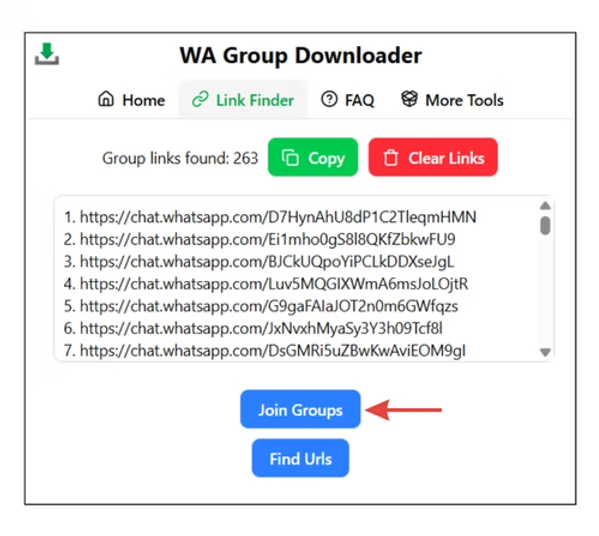
Step 1: Install & Pin the WA Contact Extractor Extension
Install the WhatsApp Contact Extractor from the Chrome Web Store and pin it to your toolbar for quick access.
Step 2: Search for WhatsApp Group Links by Category
Search a category like “Social Media WhatsApp Group Links” on Google and open WA Contact Extractor group link blogs.
Step 3: Launch the Extension & Click on Link Finder
Click the WA Contact Extractor icon in your browser and select Link Finder to scan the page.
Step 4: Click ‘Find URLs’ to Extract Links
Click “Find URLs” to automatically detect and collect all WhatsApp group invite links on the page.
Step 5: Join or Copy the WhatsApp Group Links
Once the links are scraped, click “Copy All” to copy them or “Join Groups” to join all WhatsApp groups instantly.
Features of WhatsApp Contact Extractor
WhatsApp Group Searcher
Effortlessly find and join WhatsApp group links with specific keywords and criteria using whatsapp group and link finder.
Automatic Group Link Detection
Instantly detect WhatsApp group links from any website you visit with whatsapp group and link finder.
Easy Group Joining
Seamlessly join any WhatsApp group with just one click with whatsapp group and link finder.
How to Find a Group on WhatsApp?
Finding WhatsApp groups is simple with the WA Contact Extractor Groups and Links Finder tool. Instead of relying only on invites or manually searching inside WhatsApp, you can use this extension to detect and join groups directly from web pages or group link blogs.
Step 1: Install the Extension
Download and pin the WA Contact Extractor from the Chrome Web Store for quick access.
Step 2: Search for WhatsApp Group Links Online
Look for categories such as “Education WhatsApp Group Links” or “Jobs WhatsApp Groups” on Google. Open trusted sources like the Active WhatsApp Group Links Blog by WA Contact Extractor.
Step 3: Launch the Link Finder
Click the WA Contact Extractor icon in your browser and select Link Finder. The tool will scan the page instantly.
Step 4: Extract Group Links
Press “Find URLs” and the tool will automatically collect all WhatsApp group invite links available on that webpage.
Step 5: Join or Save Groups
Once links are detected, you can either copy them in bulk or click “Join Groups” to enter them directly from your browser.
With this method, you do not need to wait for admins or existing members to share links. The WA Contact Extractor Groups and Links Finder helps you discover, copy, and join WhatsApp groups in just a few clicks.
FAQ- How to Find WhatsApp Groups?
How to join a group in WhatsApp?
To join a WhatsApp group, you typically need an invite link. Once you have the link, click on it, and it will open in WhatsApp. You can then select the “JOIN CHAT” or “JOIN GROUP” option to become a member.
How can I find WhatsApp groups?
WhatsApp groups can be discovered through various methods, such as using dedicated directory websites, mobile apps, or by finding group links shared on social networks and forums..
Where can I find group link for WhatsApp?
Group links for WhatsApp can be found on dedicated directory websites, in mobile apps, and through users sharing them on social networks like Facebook, Tumblr, and Reddit. These links are often posted in groups where members actively share them for public access.
What are the different methods to find WhatsApp groups?
Different methods to find WhatsApp groups include:
- WhatsApp Group Directory Websites: Websites dedicated to listing and sharing group links.
- WhatsApp Group Directory Apps: Mobile apps designed to list and provide access to group links.
- Users Sharing Their Group Links: Social networks and forums where users actively share group links.
What is WhatsApp Bulk Sender or WA Sender?
WhatsApp Bulk Sender is the best chrome extension used to send bulk WhatsApp messages without broadcasting. The word WA Bulk sender is a synonym for sending WhatsApp bulk messages without saving any number. Try the best WA sender tool trusted by 5000+ businesses and awarded with a rating of 4.9/5 on the Chrome store.
How to Avoid WhatsApp Ban for Bulk Messaging with WhatsApp Bulk Sender?
To avoid a WhatsApp Ban for bulk messaging, keep in mind a few things:
- USING OLDER WHATSAPP NUMBERS FOR BULK MESSAGING.
- KEEPING TIME GAPS (at least 20 secs) BETWEEN MESSAGES.
- NOT GIVING OPTION TO YOUR CUSTOMER TO UNSUBSCRIBE.
- NOT BLASTING MESSAGES TO ALL CONTACT AT ONCE(send in phases)
- DO NOT COPY AND PASTE THE SAME MESSAGES TO EVERYONE(use the time stamp feature)
For More READ at How to avoid WhatsApp Ban?
How to Send 1000 Messages at Once on WhatsApp?
For sending 1000 messages at once you can’t rely on WhatsApp Broadcast Feature as it has a lot of limitations. You should find a proven and reliable tool to count on. In comes WAMessager- the correct wa bulk sender tool. It’s drafted for use by small and medium-size businesses. Try yourself!
Read More about this at How to send 1000 Messages at Once on WhatsApp?
Are there any WhatsApp Tools offered at WAMessager- WhatsApp Bulk Sender or WA Sender?
WAMessager can be used to send bulk messaging campaigns with unlimited messages to people without saving their numbers. Its advanced algorithms protect your numbers from getting banned while running such large-scale campaigns. Some other Tools Offered are:
I was recommended this website by my cousin I am not sure whether this post is written by him as nobody else know such detailed about my trouble You are amazing Thanks
I loved even more than you will get done right here. The picture is nice, and your writing is stylish, but you seem to be rushing through it, and I think you should give it again soon. I’ll probably do that again and again if you protect this walk.