WhatsApp Contacts Extractor
WA Group Extractor | WA download Group Phone Numbers
Want to download your Whatsapp group contacts? WA Group Extractor will help you to easily retrieve and save your WhatsApp contacts in Excel and Csv.
Introduction to WhatsApp Contact Extractor
WhatsApp Contacts Extractor WhatsApp Web Extension helps to export WhatsApp group contacts from Chats and Labels into Excel, CSV, and VCard formats. This is a versatile tool designed for extracting and exporting WhatsApp contacts effortlessly. This tool simplifies the process of gathering your WhatsApp contacts, including those with unknown phone numbers, with ease. It offers a user-friendly experience, enabling you to secure your contact data while providing multiple export options such as CSV or Excel formats.
Whether you need to back up your contacts or manage them efficiently. Whether you’re looking for a WhatsApp group link finder to join, a WhatsApp group link extractor, or simply want to submit WhatsApp group links, you can do it all right here! WA Contact Extractor provides a convenient solution, making it a valuable tool for WhatsApp users.
Are you facing any of the below Problems?
If YES! Then you are at the right place
❌ Problem 1
Struggling to Find and Join WhatsApp Groups for marketing?
❌ Problem 2
Need to Extract and Export WhatsApp Group Contacts to launch campaigns?
❌ Problem 3
Want to Submit and List your WhatsApp Groups online to attract more customers?
Steps to Use WA Group Extractor
Step 1- Install the Extension:
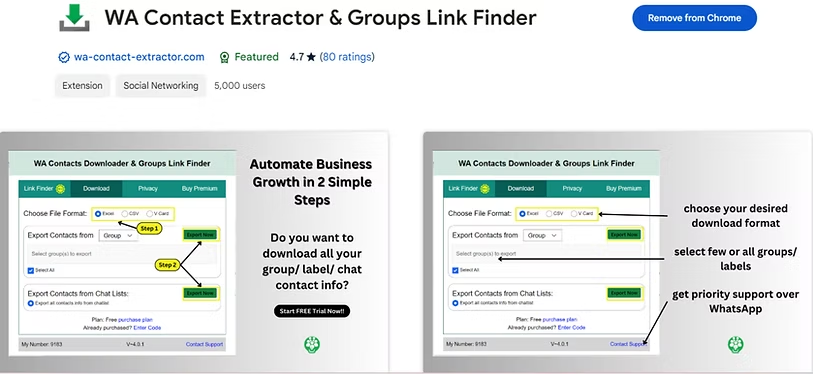
Visit the Chrome Web Store and search for “WA Contact Extractor & Group Link Finder“. Click on the extension, then click “Add to Chrome” to install it.
Step 2- Open WhatsApp Web:
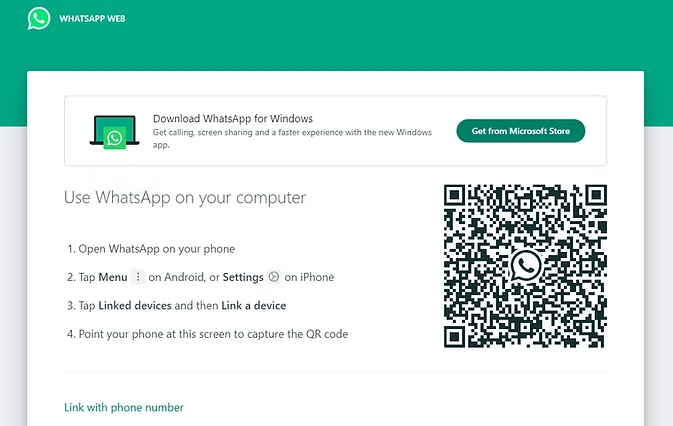
Open WhatsApp Web on your computer in Chrome by scanning the QR code with your phone.
Step 3- Click on the Extension Icon:
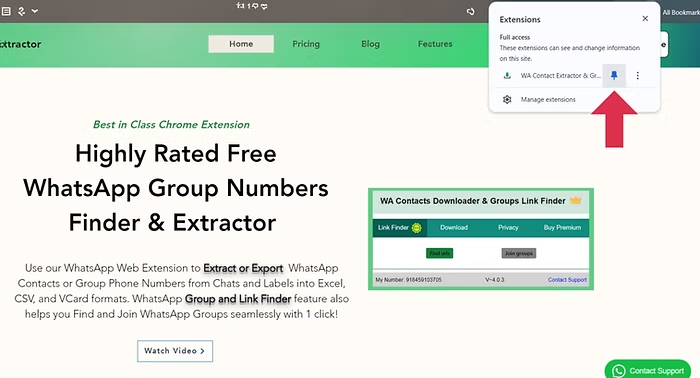
Once you tap there, WhatsApp opens, click on the WA Contact Extractor icon in your Chrome toolbar & pin it.
Step 4- Select Group/Label to Export Contacts:
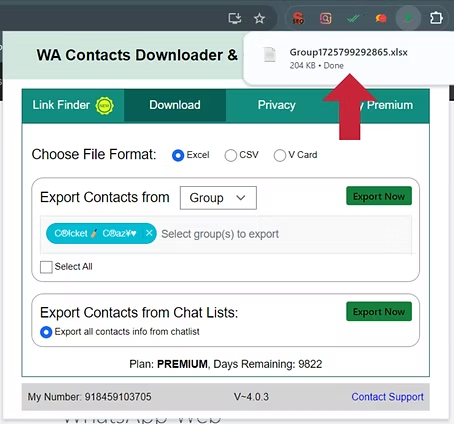
Follow the prompts to export the contacts from the group. You can choose to export them in CSV/ Excel/Vcard format. Select the group/label chat from which you want to extract contacts and hit export.
Step 5- File will be saved:
After exporting, the file will get automatically downloaded and saved to your computer for future reference or use.
Here are some more WhatsApp Tools for you!
FAQs - WA Group Extractor
Can we extract WhatsApp group contacts?
On your PC or laptop, you can extract WhatsApp group contacts using a Chrome extension and follow the steps on How to use Extractor: CLICK HERE.
You can also extract contacts on your mobile using the ‘Export Contacts for WhatsApp’ app from your Google Play Store.
What is the tool to extract numbers from WhatsApp groups?
WA download group phone numbers is a versatile tool designed for extracting and exporting WhatsApp contacts effortlessly. This tool simplifies the process of gathering your WhatsApp contacts, including those with unknown phone numbers, with ease. It offers a user-friendly experience, enabling you to secure your contact data while providing multiple export options such as CSV or Excel formats. Whether you need to back up your contacts or manage them efficiently, it provides a convenient solution, making it a valuable tool for WhatsApp users.
How can I download all my WhatsApp group contacts?
Yes, you can securely download and save your WhatsApp contacts from a group using WAMessager’s WA contacts Extractor feature .
Is it secure to use WhatsApp Contacts Extractor?
Indeed, WhatsApp Group Contacts Extractor prioritizes the security and privacy of its users. This extension operates with a stringent commitment to safeguarding your personal information. It adheres to a strict policy of not gathering or retaining any of your personal data. As a result, your confidential information remains confidential and is never at risk of being accessed or misused.
What is WhatsApp Bulk Sender or WA Sender?
WhatsApp Bulk Sender is the best chrome extension used to send bulk WhatsApp messages without broadcasting. The word WA Bulk sender is synonym for sending whatsapp bulk messages without saving any number. Try best WA sender tool trusted by 50000+ businesses and awarded with a rating of 4.9/5 on Chrome store.
How to avoid WhatsApp Ban for Bulk Messaging with WhatsApp Bulk Sender?
To avoid a WhatsApp Ban for bulk messaging, keep in mind a few things:
- USING OLDER WHATSAPP NUMBERS FOR BULK MESSAGING.
- KEEPING TIME GAPS (atleast 20 secs) BETWEEN MESSAGES.
- NOT GIVING OPTION TO YOUR CUSTOMER TO UNSUBSCRIBE.
- NOT BLASTING MESSAGES TO ALL CONTACT AT ONCE(send in phases)
- DONT COPY AND PASTE THE SAME MESSAGES TO EVERYONE(use time stamp feature)